AI Chat Launcher: AI Assistant
- 4.5
- Rating
- 100.00K
- Installs
- Free
- Price

 Analysis by App-foxy
AI Chat Launcher: AI Assistant is a productivity app from AtomApplications that puts access to several well-known AI services behind a single starting point. I approached it less like a novelty chatbot and more like a daily tool: can I reach an assistant quickly, understand what is happening on screen, and use it comfortably in different situations? My overall impression is positive, especially for people who regularly switch between AI models and do not want to keep searching through separate apps or browser tabs.
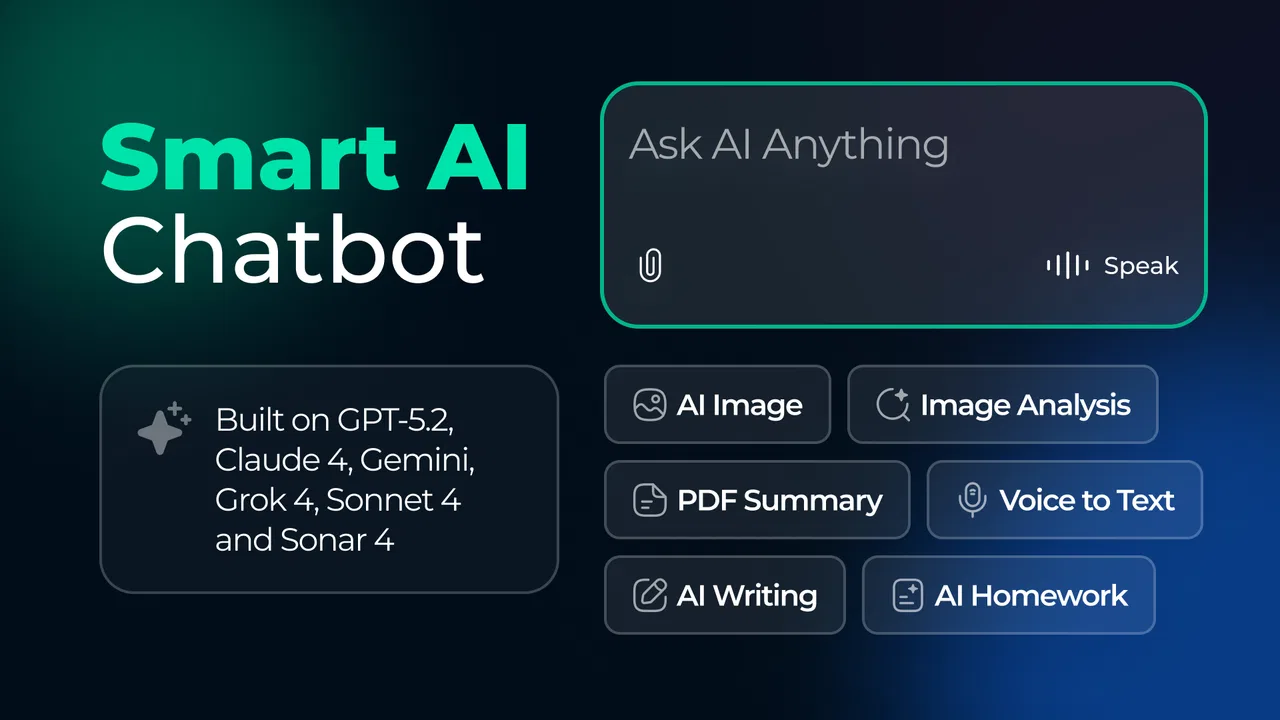
The app is free, aimed at Everyone, and its current version is 3.3.0. It has reached over 100 thousand installs and holds a 4.3 average from around 1.8 thousand ratings, which suggests that the basic idea is connecting with a meaningful group of users. The key attraction is not that it replaces every productivity tool. Instead, it acts as a convenient doorway to AI chat, with GPT-5.2, Gemini, and Claude presented as the main choices.
How the launcher feels to use day to day
The launcher approach makes the first interaction feel different from opening a single-purpose chatbot. Rather than committing immediately to one assistant, I can treat the app as a central starting place. That is useful when I want to compare how different systems handle the same question, or when one model feels better suited to a particular task than another.
You May Also Like

 Pandora - Music & Podcasts
Pandora’s Music Is Easy to Start, but Harder to Recover
Pandora’s strength is its low-effort path from a seed to a station. Its weak spot is how much confidence it asks you to place in connection, setup, and quiet recovery.

 AccuWeather: Weather Radar
AccuWeather Review: A Quick, Clear Forecast for Everyday Decisions
For everyday plans, the best forecast is the one you can understand quickly. AccuWeather makes rain timing, radar, and local conditions easy to act on, with a few trade-offs.

 Hill Climb Racing
Why Hill Climb Racing Still Turns Crashes Into One More Run
A tiny car, a bumpy hill and one more upgrade: Hill Climb Racing keeps resurfacing because its simple chaos makes every near-miss feel personal.

 AliExpress - Shopping App
AliExpress Makes Global Shopping Feel Personal, but Shoppers Bear the Risk
AliExpress turns a global marketplace into a pocket-sized discovery engine. Its reach is useful, its shopping loop compelling, and its trade-offs easy to miss.

 Lords Mobile: Kingdom Wars
Lords Mobile Is a Kingdom-Building Routine, Not a Quick Match
A case-by-case verdict on the building, battles, device demands, and social commitments that make Lords Mobile rewarding for some players and exhausting for others.

 PDF Scanner app - TapScanner
TapScanner Makes Paperwork Easier to Capture, Check, and Share
TapScanner makes scanning with a phone feel less like a rescue operation and more like a dependable step in getting work done. Its capture tools are useful, though not flawless.
More From Our News Desk
View All News


For example, I might begin with a rough email draft, ask one assistant to make it warmer, and then use another to check whether the wording is clear. This workflow is more practical than it sounds because different AI systems can produce noticeably different styles. The app’s value comes from reducing the friction of moving between those options.
Navigation matters here. A launcher should make the next step obvious, and this app’s concept is easier to understand than a crowded productivity suite with calendars, notes, reminders, and document tools competing for attention. The central purpose is clear: open the app, choose an AI route, and start chatting. For readers who prefer a focused interface, that simplicity is a real advantage.
At the same time, a launcher is not automatically simpler for everyone. If you only ever use one chatbot, adding another layer may feel unnecessary. A direct official app can be quicker once it is already familiar, particularly for someone who has saved conversations, established preferences, or a well-organized history there. I see this app as most useful for people who value choice more than having every conversation system managed in one dedicated place.
Readability and navigation in practical situations
I found the overall concept easy to explain to another person: this is a productivity hub for reaching AI assistants. That clarity helps when introducing it to someone who is curious about AI but does not want to learn several separate apps at once. It can also be useful on a shared device, where a single recognizable entry point is easier to locate than multiple similar-looking chatbot icons.
One of my favorite ways to use a multi-model launcher is to separate tasks by purpose. I can use one conversation for brainstorming, another for rewriting, and a third for checking a complicated explanation. That separation reduces the temptation to keep forcing one assistant to do everything. It also gives me a more honest sense of which model is helping and which one is producing an answer that needs more work.
A small but important habit is to decide what I need before opening the app. If I want a quick definition, I can go straight in and ask. If I need a careful comparison, I prepare the question first and keep the wording identical when testing different assistants. This makes the launcher more useful as a comparison tool rather than merely a shortcut.
The app runs on Android with a minimum operating system requirement of 10, so compatibility is relevant for people using older phones. On supported devices, the experience is likely to depend as much on the chosen AI service and the phone’s general performance as on the launcher itself. That distinction matters: a convenient entry point cannot eliminate delays or differences caused by the underlying assistant.
Motor and sensory considerations
For users with motor limitations, the strongest benefit is the reduction in repeated navigation. Opening one app instead of locating several services can mean fewer taps and less visual searching. That becomes particularly helpful when I am holding a phone one-handed, using it while standing, or trying to complete a short task without settling into a long session.
The launcher format may also support people who find app switching tiring. A typical workflow can involve opening a browser, searching for a service, signing in, returning to another screen, and repeating the process for a different assistant. Bringing the starting point together can make that sequence feel less demanding. I would not describe it as a complete accessibility solution, but the shorter route can still make a practical difference.
Voice, hearing, vision, and touch needs require more caution. I would not assume that the launcher itself provides specialized controls simply because it connects to AI services. Someone who relies on screen magnification, a screen reader, voice input, captions, or alternative touch methods should test the app on their own device and see whether the visible controls and transitions behave comfortably.
There is also a sensory advantage in avoiding unnecessary visual clutter. A focused AI entry point can be calmer than a general productivity dashboard filled with unrelated alerts and destinations. However, conversations with AI can become text-heavy very quickly. For users who experience reading fatigue, the practical experience may depend on the selected assistant’s response length and on the phone’s own display and text settings.
I recommend using short prompts when concentration or reading stamina is limited. Asking for a brief answer, a numbered procedure, or one step at a time can make the interaction easier to follow. This is not a special feature of the app, but it is an effective way to make its AI-centered workflow more manageable.
Situational access beyond the desk
The app makes the most sense when I need AI in a moment that does not justify a full desktop workflow. Imagine standing outside a shop and needing a polite message to reschedule an appointment. I can open the launcher, choose an assistant, describe the situation in plain language, and refine the result before sending it. The value is speed and reduced context switching, not a deep project-management system.
It can also help during study sessions. I might ask for a difficult paragraph to be explained in simpler language, then request a short list of key terms. Switching models gives me another way to approach the same material if the first explanation feels too abstract. I still need to verify important academic information, but the ability to try different explanations is genuinely useful.
For work, I would use it for early-stage tasks: outlining a presentation, turning rough notes into a cleaner structure, generating alternative subject lines, or identifying questions I should ask before making a decision. I would not treat the first answer as finished professional work. The launcher makes experimentation convenient, while judgment, editing, and fact-checking remain my responsibility.
Situational access also includes moments when attention is divided. A single entry point is handy when I am commuting, moving between rooms, or dealing with a short break. Yet those contexts create their own risks. I avoid entering private work details, personal identifiers, or confidential material unless I fully understand where the conversation is being handled and what the relevant service requires.
That is one of the most important trade-offs. Convenience encourages quick questions, but quick questions can lead to careless sharing. I use neutral examples whenever possible, replace names with descriptions, and remove information that an AI assistant does not need. The launcher makes access easier; it does not remove the need for privacy judgment.
What can still create barriers
The biggest remaining barrier is that the app brings multiple AI choices together without making the differences between them disappear. A first-time user may still wonder which assistant to choose, whether the same prompt should be repeated, and how to judge conflicting answers. The launcher reduces the number of places to visit, but it does not teach AI literacy by itself.
There is also a cognitive cost to having several options. More choice can be helpful for experienced users, but it can slow down someone who simply wants one dependable answer. If I find myself comparing every response instead of completing the task, the convenience has turned into distraction. In that situation, a single familiar assistant may be the better option.
Another limitation is the boundary between access and control. A launcher can direct me toward GPT-5.2, Gemini, and Claude, but the quality of the final experience still depends on the selected service, the prompt, the conversation context, and the answer itself. I should not assume that choosing a different model automatically fixes an unclear response or guarantees a correct one.
People who need a full productivity environment may also outgrow this app quickly. It is not a replacement for a dedicated notes system, document editor, task manager, or specialized accessibility tool. I would skip it if my main goal is structured project tracking or offline work. Its strength is conversational access, not the organization of an entire personal workflow.
There is a practical learning curve in developing a reliable routine. I get better results when I state the audience, desired format, length, and tone instead of writing a vague request. For accessibility-related tasks, I might ask for plain language, clear headings, and one action per step. That level of direction makes the output easier to scan and reduces the amount of editing afterward.
Who benefits most from the multi-assistant approach
I would recommend the app to curious users who want to explore more than one AI service without maintaining several separate starting points. It is particularly appealing to students, writers, office workers, and people who use AI for quick explanations or drafting. The free price also lowers the barrier to trying the workflow before deciding whether it deserves a permanent place on the phone.
It is a good fit for someone who values flexible problem-solving. If one assistant gives a stiff rewrite, another may offer a more natural version. If one explanation is too technical, a second attempt can provide a different angle. I see that variety as the app’s most meaningful productivity benefit.
I would be more hesitant to recommend it to someone who wants a single, highly predictable experience with minimal decisions. Users who already have a favorite official chatbot and rarely need anything else may gain little from a launcher. Likewise, people handling sensitive information should prioritize the privacy and account practices of the services they use rather than assuming that a central app makes those concerns simpler.
The Everyone content rating makes the app approachable for a broad audience, but that does not mean every AI answer will be suitable without supervision. Younger users and anyone using it for health, legal, financial, or safety questions should treat responses as starting points and seek appropriate human or authoritative guidance when the stakes are high.
My inclusive verdict after using it as a daily tool
AI Chat Launcher: AI Assistant works best as a low-friction doorway to several conversational AI options. I appreciate that it can shorten the path from “I need help with this” to actually asking the question. Its inclusive value is practical rather than absolute: fewer app switches, a focused purpose, and the possibility of choosing a response style that better matches the user’s needs.
Still, I would not present it as a universal answer for accessibility or productivity. People with specific motor, sensory, or cognitive requirements should check how the interface behaves with their own device settings and preferred assistive tools. Users who need document management, dependable offline access, or a tightly controlled professional workflow may be better served by a dedicated alternative.
AtomApplications has built something useful for people who see AI as a set of tools rather than one destination. My advice is to start with small, low-risk tasks, compare assistants only when comparison adds value, and ask for readable output when clarity matters. If that sounds like the way you already work, this free productivity app is worth trying. If you want one polished chatbot with no extra choice, a direct alternative will probably feel more natural.
The app was released on January 22, 2025, and its present 3.3.0 version gives it a clear, focused role: make AI chat easier to reach from one place. I would keep it installed for drafting, explanations, and quick perspective checks, while remembering that the launcher improves access to answers—not the responsibility to review them.
FAQs for AI Chat Launcher: AI Assistant
01What are the main features of AI Chat Launcher: AI Assistant?
AI Chat Launcher: AI Assistant offers a seamless integration of AI technology with your device’s interface. It provides voice-activated commands, personalized suggestions based on your usage habits, and a customizable home screen. Additionally, it includes a smart search function to quickly find apps, contacts, or web results.
02Is AI Chat Launcher safe to use regarding privacy and data security?
AI Chat Launcher prioritizes user privacy by employing encryption for all data exchanges and offering customizable privacy settings. Users can control which data is shared with the AI for personalization. Regular updates ensure security protocols are up-to-date, minimizing potential risks associated with data breaches.
03Can AI Chat Launcher improve my phone’s performance?
Yes, AI Chat Launcher is designed to optimize your phone’s performance. It uses AI algorithms to manage background processes efficiently, reducing battery drain and memory usage. The streamlined interface and quick access to apps also contribute to a smoother, faster user experience.
04Does AI Chat Launcher support multiple languages?
Absolutely, AI Chat Launcher supports a wide range of languages, making it accessible to a diverse user base. The language settings can be easily adjusted in the app’s preferences, allowing users to interact with the AI in their preferred language for a more personalized experience.
05What devices are compatible with AI Chat Launcher?
AI Chat Launcher is compatible with most Android and iOS devices running the latest operating systems. It’s optimized for both smartphones and tablets, ensuring a consistent user experience across different screen sizes and device capabilities. Users should check the app store for specific OS requirements before downloading.
Pros
- Intuitive interface for easy navigation.
- Quick response time from the AI.
- Customizable themes and settings.
- Integrates smoothly with other apps.
- Supports multiple languages for versatility.
Cons
- Occasional lag on older devices.
- Limited free features; premium required.
- Requires internet for full functionality.
- Ads can be intrusive in the free version.
- Some responses lack depth or creativity.

AI Chat Launcher: AI Assistant
Gallery